Native Windows program · no subscription, no cloud account

Back up, restore and recover whole disks

Save an exact image of any disk, clone it, put it back on new hardware, get deleted files back and scan for malware - from one clear window that explains every step and shows exactly what it is doing.

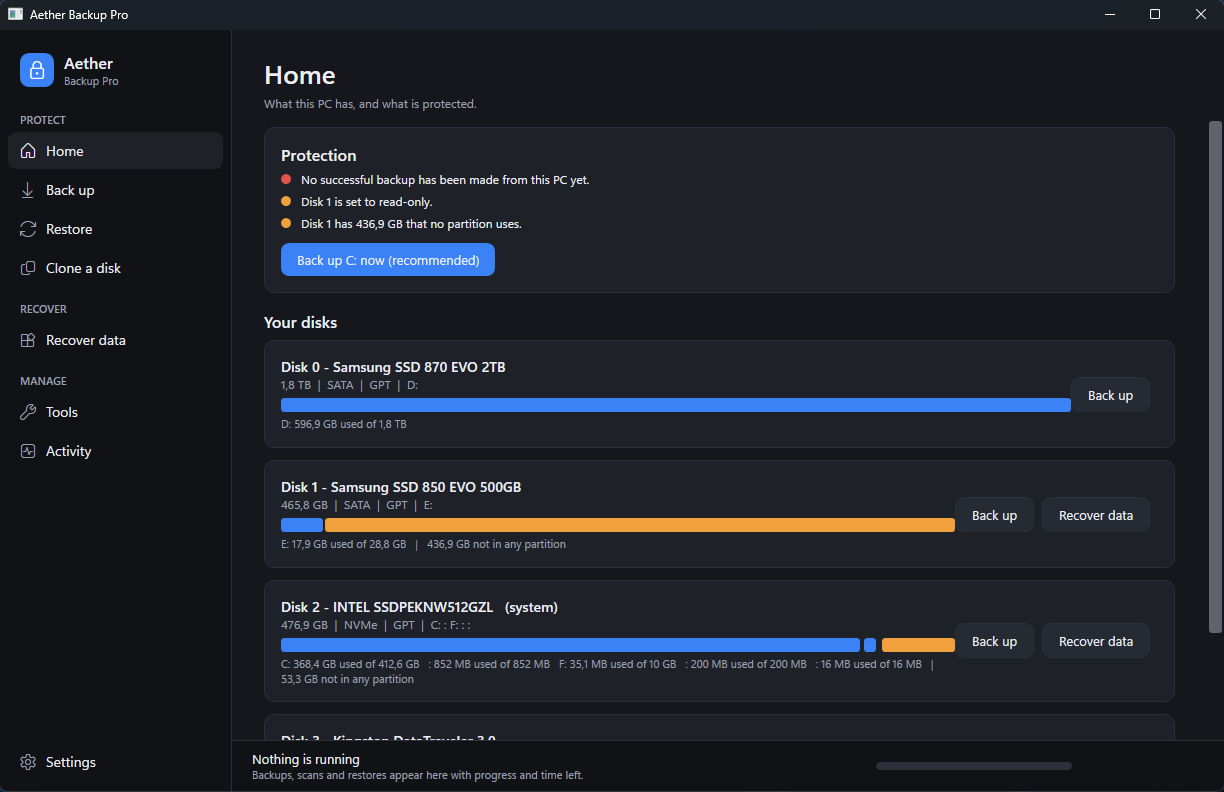
Aether Backup Pro home screen showing disks, partitions and unallocated space

Everything in one place

Each area has its own colour and its own step-by-step wizard, with safe defaults already chosen.

Disk images

Whole-disk images with a Volume Shadow Copy, so a running Windows is saved consistently. Optional password encryption, incremental images through the automatic schedule, and verification against per-block checksums.

Restore & clone

Write an image back to a new disk or clone disk to disk. Moving to a bigger disk? The extra space is extended into the last partition automatically instead of sitting there unused. The wizard lists what will be destroyed and asks you to type a confirmation before anything is overwritten.

Recover data

Finds partitions that vanished - also through the copy NTFS keeps at the end of a volume - and carves pictures, PDFs and Office documents off the raw disk. It only ever reads the damaged disk.

Malware scan

Quick and deep scans of processes, start-up entries, services, drivers and files, with a signed rule pack and an HTML report you can keep. Plus a read-only check of Secure Boot, HVCI, Defender, Firewall and BitLocker.

Automatic

One click sets up a weekly incremental backup in Task Scheduler that runs even when nobody is logged in, chooses the best drive by itself and keeps a sensible history.

See everything

The Activity view shows percentage, speed, time left, the partition and position on the disk (or the file being scanned) and the live output of the engine underneath.

🔒

Crash-safe backups

A backup writes to a hidden file first and is only given its real name after verification succeeds - a power loss or a crash mid-backup can never leave behind a file that looks like a finished, trustworthy backup but isn't.

🌐

15 languages

The whole interface, including every wizard step and error message, switches language instantly - no restart needed.

What it looks like

Guided steps with safe defaults, and every disk drawn with all of its partitions.

Backup wizard: choose the disk
Recover data: find lost partitions and files

Three clicks to protected

No manual to read first.

Pick the disk

Every disk is drawn with all its partitions. Space that belongs to no partition is highlighted, so nothing hides.

Accept the destination

The program suggests the drive with the most free space that is not the disk being saved.

Start - or make it automatic

Tick the schedule box and the same backup repeats by itself. Verification runs after every image.

What is inside

The interface is native (WPF on .NET); the disk work is done by small, separate engines that you can also run from the command line.

PartWhat it does
Aether.exeThe window: wizards, live activity, settings, themes
rawimage.exeBlock-level capture, verify, restore, clone, consolidate (C++, direct disk access)
deepscan.exeMalware and rootkit second-opinion scanner
SystemGuard.ps1Retention, driver injection, scheduling and automation glue

Questions

Can it overwrite my system disk by accident?

No. The system disk, read-only disks and disks that are too small are greyed out in the restore and clone wizards, and every overwrite asks you to type a phrase that names the disk and lists the data that will be lost.

Does scanning or file recovery change the damaged disk?

No. Both only read. Recovered files are saved to a folder on another disk, and the program refuses a folder on the disk being recovered.

Where is my data stored?

Images stay where you put them. Settings, history and reports live in %LOCALAPPDATA%\SystemGuard. Nothing is sent anywhere.

What do I need?

Windows 10 or 11, administrator rights and the .NET 10 Desktop Runtime. Optional: Hyper-V (boot a backup as a virtual machine) and the Windows ADK (build a rescue ISO).

Has it been tested?

The built-in self-test (Aether.exe --selftest) runs 22 checks with the real engines on scratch virtual disks, including deliberately broken cases: a corrupted image, a wrong password, a too-small target disk. A separate script goes further - it captures a real running Windows VM's disk, verifies the image, restores it onto a brand new virtual disk, boots that disk in a fresh VM, and confirms it actually comes up. Last full run: capture, verify and restore each finished in under five minutes, and the restored copy booted with a healthy heartbeat in 5 seconds.

Get it

A ready-to-run copy - no build tools, no source access needed.

Unzip it anywhere, then run Aether.exe as Administrator. Needs Windows 10/11 and the .NET 10 Desktop Runtime. Run Aether.exe --selftest once to confirm every function works on this PC.